Operations
Run the front deskand the teaching teamin one app.
Families write by email, text, phone and the portal, and front desk staff chase all four. XTutio puts every message in one team inbox, gives tutors a whiteboard made for teaching and a document editor for worksheets, and runs the front desk and the teaching team in one app, in your centre's name.
All inboxes
Send to manyNew email- Pat Ellis9:06
Year 9 maths for our daughter
ContactHi, we are looking for a weekly maths tutor...
- 0400 555 0108:45
Text from 0400 555 010
ContactText👤 JordanCan we move tomorrow's lesson to 5pm?
- Robin Santos7:50
Voicemail from 0400 555 022
ContactCallVoicemail, 38 seconds
- Casey DoyleFri
Question about the invoice
ContactPortalWhy was I charged for the 3rd of October?
Year 9 maths for our daughter
Email with Pat Ellis · Open · Not assigned
Pat EllisTo contact@yourcentre.example
Hi there, we are looking for a weekly maths tutor for Mia (Year 9) from Term 4. Do you have anything on Thursdays after 4pm?
📎 Mia-last-report.pdf · 180 KBTeam comment Only your team sees this.
@Jordan Thursday 4:30 with Alex is free. Can you offer it?
A text for the tutor
- ways families reach you, one list
- 4
- to undo a team inbox send
- 10s
- conversations tidied at once
- 100
- keyboard shortcuts
- 24
Team inbox
Every family message. One conversation.
Front desk staff check three inboxes, a phone and the portal, and a parent's message still slips through. Whether a parent emails, texts, rings or writes in the portal, it now lands in the team inbox with the family beside it, so whoever is on the desk can pick it up.
All inboxes
Send to manyNew email- Pat Ellis9:06
Year 9 maths for our daughter
ContactHi, we are looking for a weekly maths tutor...
- 0400 555 0108:45
Text from 0400 555 010
ContactText👤 JordanCan we move tomorrow's lesson to 5pm?
- Robin Santos7:50
Voicemail from 0400 555 022
ContactCallVoicemail, 38 seconds
- Casey DoyleFri
Question about the invoice
ContactPortalWhy was I charged for the 3rd of October?
- Parent AccountFri
Payment confirmation INV-0102
AccountsWe paid this morning by bank transfer.
Year 9 maths for our daughter
Email with Pat Ellis · Open · Not assigned
Pat EllisTo contact@yourcentre.example
Hi there, we are looking for a weekly maths tutor for Mia (Year 9) from Term 4. Do you have anything on Thursdays after 4pm?
📎 Mia-last-report.pdf · 180 KBTeam comment Only your team sees this.
@Jordan Thursday 4:30 with Alex is free. Can you offer it?
Every channel in one list
Emails to your shared mailboxes, texts to your centre's number, calls and voicemails, and messages families send in the portal. Tabs for Emails, Texts, Calls and Portal when you want one kind.
The family beside the message
A message is matched to the family by its email address or phone number, within your centre. One tap opens the family.
Assign, close and snooze
Give a conversation to one person, close it when it is done, or snooze it until you can deal with it. Assigned to me and Snoozed are folders of their own.
Reply from the right address
Reply, reply all or forward from the shared mailbox the family wrote to, with Cc, Bcc and attachments, and a send you can undo for 10 seconds.
Your shared mailboxes
Connect contact@ and accounts@. Choose who sees each.
Admins usually forward shared mail around by hand, and nobody knows who answered. Your shared mailboxes come into the team inbox by Microsoft sign-in instead: nothing to forward, and nothing changes for anyone still reading them in Outlook.
Connect by Microsoft sign-in
Your Microsoft admin signs in once and approves. Tick the shared mailboxes the team should share, such as contact@ and accounts@, and mark one as the contact inbox.
Sent mail stays in Outlook too
A reply goes out from the shared mailbox itself, so it sits in that mailbox's Sent Items for anyone still working there.
Access chosen per inbox
Pick the roles or people who see each mailbox. Accounts can be for finance and admins only, while the contact inbox is for the front desk.
Tutors never see it
The team inbox is for the front desk. When a message is for a tutor, Pass to tutor sends it on to the tutor's own mailbox, with the conversation quoted.
Microsoft is connected. Now choose the mailboxes.
Choose the mailboxes
- Contactcontact@yourcentre.example · Shared mailboxContact inbox
- Accountsaccounts@yourcentre.example · Shared mailbox
- Infoinfo@yourcentre.example · Shared mailbox
Who sees each inbox
- ContactAdminReceptionist
- AccountsAdminFinance
Tutors never see the team inbox.
Your Centre
Text from 0400 555 010
Assigned to Jordan Lee
Family: Dana Santos's family, Liam
Hi, it's Dana. Is Liam's lesson still on for tomorrow?
Hi Dana, yes it is. 4pm at the main campus.
Can we move tomorrow's lesson to 5pm?
Work it as a team
Comments, mentions and a draft to start from.
Questions about a family get lost in side chats, and long threads take ages to catch up on. Talk about a conversation where it is, ask the AI to summarise it or draft the reply, and hand it to the right person.
Comments only your team sees
Write a note on a conversation that is never sent. Type @ and a name, and that person is told in the app. Mentions is a folder of its own.
AI draft and summary, names hidden
Ask for a draft reply or a summary of a long conversation. Names and contact details are swapped out before anything reaches the AI, and put back for the person reading.
Send to many
When the message is for every family, Send to many opens Broadcast, with its unsubscribe and opt-out rules.
More than 5 recipients asks first
A send to more than 5 people asks you to check, and 50 is the most one email goes to. Every send is recorded against the person who pressed it.
Question about the invoice
Portal message from Casey Doyle · Family: Demo family, Ari
✦ Summary
Casey cancelled Ari's lesson on 2 October and asks why 3 October was charged.
Names and contact details were hidden from the AI.
Team comment Only your team sees this.
@Sam can you check the cancellation before we reply?
Calls, with a coach
Answer the phone with your whole manual beside you.
New front desk staff put parents on hold while they hunt for a price or a policy. With your centre's Twilio number connected, staff take and make calls in the portal, and the coach listens to the live captions and offers the answer from your centre's own articles.
Call with Sam Rivera
00:41 on the call · Live captions on
- Caller: Hi, I'm looking for help with maths for my daughter in Year 5.
- You: Of course. Which days suit you, and I can tell you about lessons.
- Caller: How much does a lesson cost, and is there a discount for two kids?
Knowledge
Search prices, hours, cancellations
- Cancellation and rescheduling
- How to book a trial lesson
- Opening hours
- Prices
Suggested replies
Up to 3, from the last 90 seconds
Primary lessons are $55 for 60 minutes, and a second child booked together gets 10 per cent off.
From: Prices
CopyDismissWe can book a trial lesson now. Which day suits you best?
From: How to book a trial lesson
CopyDismiss
Ask the manual
What is the late cancellation rule?
Cancelling with more than 48 hours notice is free. Inside 48 hours a late fee applies, held for 7 days, so offer a makeup first.
From: Cancellation and rescheduling
CopySuggested replies while you talk
About every 15 seconds the coach reads the last 90 seconds of the call's live captions and offers up to 3 replies, each from one of your own articles. Copy one, or dismiss it.
Your centre's own knowledge
Short articles your centre writes: prices, opening hours, cancellations, how to book a trial. Search them and copy a line while the caller waits. Start from the examples in one tap.
Ask the manual
Type a question and get the answer from your articles, with the article it came from. If your articles do not cover it, it says so rather than making something up.
Names stay out of the AI
The caller's and the family's names are swapped out and contact details removed before anything reaches the AI. Nothing is kept but the replies offered.
Quick-dial from any staff page
The Call button is on every staff page and the call keeps going as you move between them, with a slim bar for Mute and Hang up while the panel is closed.
Rings the team, then takes a message
A family's call rings the staff who are free. If nobody answers, it takes a voicemail that lands in the team inbox, or forwards to a phone you choose.
What each call costs
An estimate on every call from its length and direction, and a monthly spend table, clearly marked as an estimate beside your Twilio invoice.
Who called whom, each week
Team activity shows each person's calls and what came of them; weekly activity shows the last 8 weeks.
XWrite, the document editor
Word for worksheets, with the answer key built in.
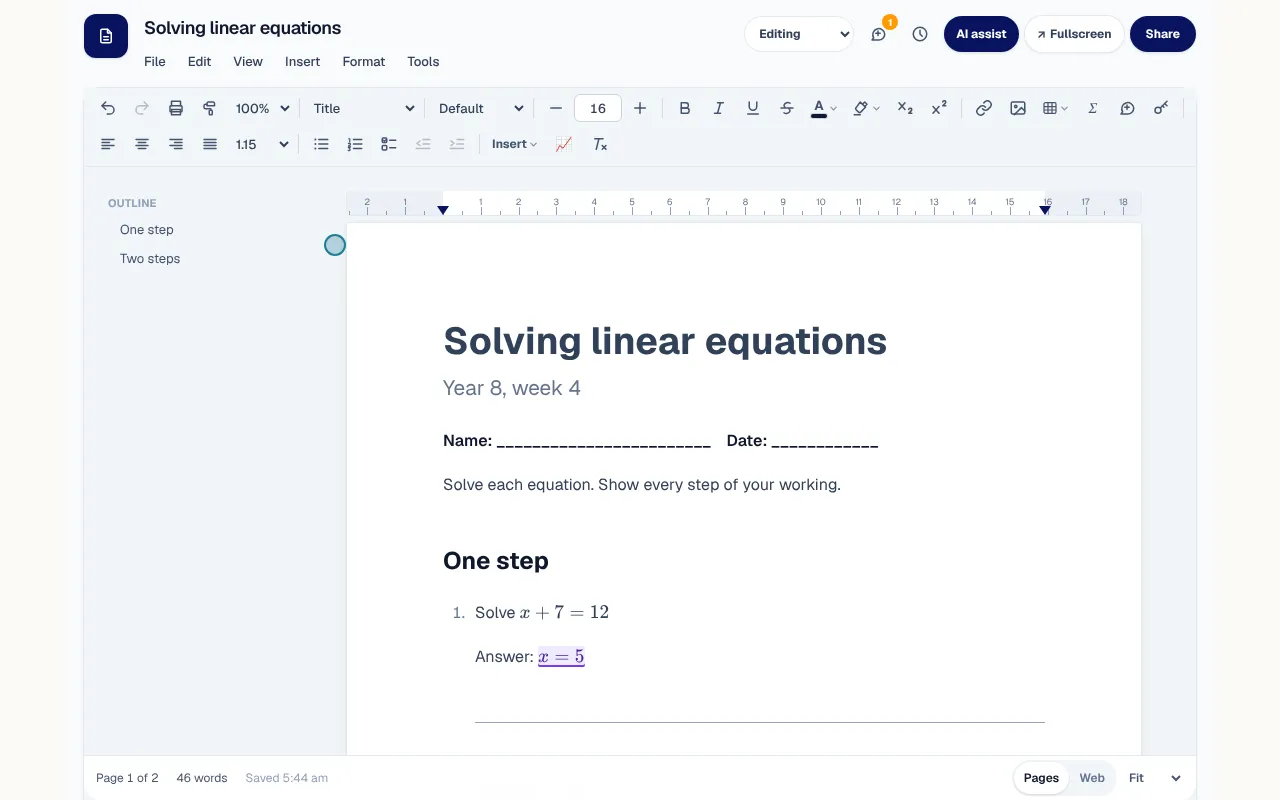
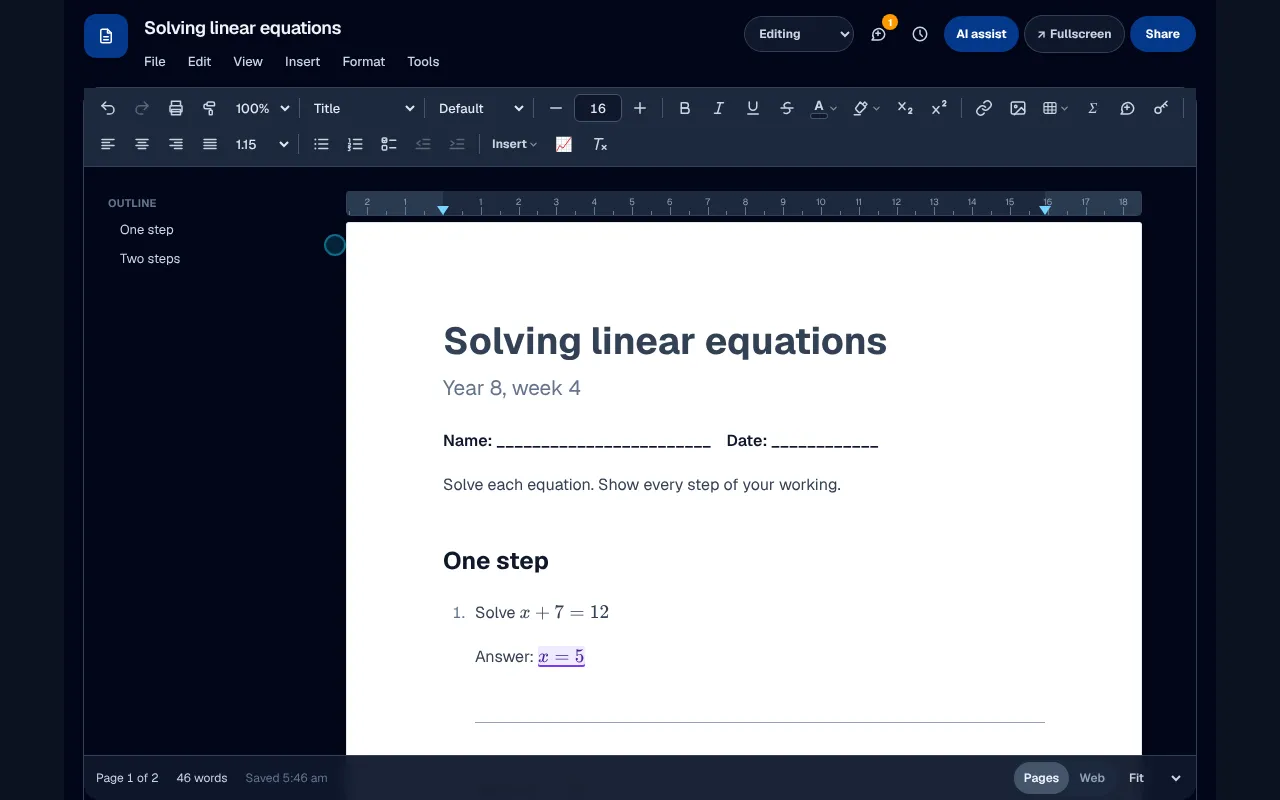
Tutors keep two copies of every worksheet, one with answers and one without, and fight the maths. Here is everything your staff know from Word, inside your portal, plus what a tutoring centre needs: answers marked once, a student copy in one step, and maths you can type.
The answer key built in
Mark any answer as an answer, hide the answers to see the student's page, and make a student copy with every answer left as a line.
Maths as you type
Write an equation between dollar signs and it turns into typeset maths as you close it.
Opens and saves Word files
Open a Word file with its colours and page setup, and download as Word or PDF.
Comments and suggestions
Threaded comments, suggested changes to accept or reject, and earlier versions kept as you work.
XInk, the whiteboard
A whiteboard made for teaching, not for meetings.
Meeting whiteboards lag behind a pen and lose the working when the call ends. This board is the same in the online classroom, in a staff meeting and in Documents: tutors write with a pen on an iPad and every student sees it as it is written.
Ink that keeps up
Every stroke appears on the other boards as it is written, made for an iPad and a pen.
Follow me
Turn the page or zoom in and every student's board follows, fitted to their own screen.
A ruler, a protractor and graphs
Draw along the ruler, measure an angle, or draw a graph on numbered axes from y = ...
Watch it written again
Replay a page stroke by stroke after the lesson, or save it as a PDF.

Mail and Broadcast
Nothing waits too long. Nothing goes out by mistake.
A family left waiting a week, or an email sent to the wrong list, costs a centre its reputation. Every staff member has their own mailbox in the portal, and Broadcast reaches every family at once, with the right rules for each kind of message.
Needs reply
The conversations waiting on you, oldest first, with how long each has waited. A colleague writing from your own domain never counts.
Undo send, 8 seconds
A sent message waits so you can take it back, and closing the window does not lose it.
Schedule send and snooze
Write tonight and send in the morning. Snooze a conversation, or be reminded if nobody replies.
Broadcast, the right kind
Email or text every family. Choose a promotion, which carries an unsubscribe link or "Reply STOP" in a text, or an operational notice, for 4 things only: a closure, cancelled lessons or a safety notice.
Needs reply
3Oldest first
- Priya HarringtonWaiting 2 days
Sam's homework this week
- Lee OkaforWaiting Yesterday
Re: Holiday lessons
- Nina BrooksWaiting 3 hours
Can Isla change to Tuesdays?
Your Centre
Broadcast
To parents, by text
What is this message?
○ A promotion
Families who opted out are skipped.
● An operational notice
- ● A closure (the centre or a campus is shut)
- ○ Lessons cancelled or moved
- ○ A safety notice
- ○ An emergency (for example the centre is evacuated or a lesson is unsafe)
The Main campus is closed on Friday for a power outage. Lessons move online.
Send to 212 parentsRead more
Each tool, in detail.
Word and Outlook are trademarks of Microsoft Corporation. XTutio is not affiliated with Microsoft.
Keep your families
See who might leave, and ask the ones who would stay.
Owners often learn a family is unhappy when the cancellation arrives. Every figure here comes from your own records, and nothing reaches a parent until a person sends it.
A calendar of school exams
Where your centre switches it on, the exam notices families send become one calendar of school assessment dates, with the busy weeks marked. AI reads a notice only when a staff member presses Read this notice, keeps no child's name, and nothing counts until a person confirms it.
The owner's scorecard
Active families, retention, revenue, attendance, seat use and money owed, each against last month at the same day, with a twelve-month trend.
Family check-ins
Parents rate lessons and answer a check-in from 0 to 10. A low score goes to follow-up, and you choose who reads comments about a tutor.
Termly reports
Before term ends each student gets a drafted report: attendance, homework, levels and a note in the tutor's own words. Every figure comes from the record, and a person releases it.
Next term, in one tap
With the report, a family can keep its day, time and tutor for next term. Nothing renews by itself: staff book it.
A waitlist
Families wait for a subject, days and a campus. When a time frees up, staff offer it in the order families joined, and the first to accept gets it.
The first six weeks
New families get a welcome call and a check-in on your task list, a flag for a no-show or a quiet parent, and win-back emails drafted for staff to send at 60 and 120 days.
Scorecard
October so far, against September at the same day
Active families
186
+6
Retention
94%
+1 pt
Attendance
91%
-2 pts
Seats used
78%
+4 pts
Needs a call
The Brown family
Check-in score 4 · 'Times don't suit'
The Patel family
Week 4 · no parent sign-in for 14 days
Next term
Reports released
Kept their time
On the waitlist
Your team
Tasks, leave and a word of thanks.
Jobs on sticky notes and leave requests by text get lost. The front desk shares one board, and tutors see the good news first.
A shared task board
Give a task to a person or a role, with a due date and a link to the family, lesson, enquiry or invoice it is about. Mine, Overdue and By due date keep the day in order.
Leave, approved
Tutors ask for whole days or a few hours. Approving it flags the lessons affected and asks the best-matched tutors to cover, and families are told only when you choose.
An anonymous pulse
Once a term tutors answer a short check-in that records no name, campus or role. You see totals only, and nothing at all from fewer than five answers.
Thank-yous and milestones
A tutor's home page marks 100, 250, 500 and 1,000 lessons, shows kind words from families, and carries thank-yous from the owner.
Tasks
Mine · My role's · Overdue · By due date
To do
Call the Brown family
Reception · today
Chase invoice INV-2033
Finance · Fri
Doing
Cover for Liam's Thursday
Admin · tomorrow
Done
Welcome call: the Chen family
Reception · Mon
Leave requests
Liam Nguyen · Thu 24 Oct, 3 pm to 6 pm
2 lessons need cover · 3 tutors asked
Make it yours
Your fields, your words, your subjects.
Staff should not have to learn new words for things they already do. Set the portal up the way your centre already talks.
Fields of your own
Add your own questions to families, students and tutors, or add the safety set in one tap: pickup contacts, medical plans, allergies and more. Their answers never go to an AI, an email or a log.
Your own words
Call students learners or lessons sessions. Your words appear in the staff and parent menus, the calendar, the enrolment form and the main family emails.
Your own subjects
Add subjects you teach, such as public speaking or coding, with a year range, and hide the ones you don't. Pay rates by subject work for yours too.
Coloured tags
Tag families and students one at a time or up to 200 at once, filter the lists by tag, and send a Broadcast to just the families tagged.
Up a year, once a year
Move every student up a year in one go: preview it, tick anyone repeating, leave Year 12 as it is, and undo it within 30 days.
Roles in plain words
Every permission says in plain words what it unlocks, and flags the ones that reach private details, money or pay. Change a role for your centre, or one person's access, with one checklist and one Save. Nobody can give more than they hold or change their own.
Custom fields
Questions of your own on families, students and tutors
Students
Add the safety setMedical or asthma plan
Yes or no · tutors can read
Allergies
Long text · tutors can read
Who may collect
Text · tutors can read
School
Text
Your words
Student
Lesson
Tags
Telling people
In the app, on their phone, and only what they asked for.
Too many messages and people stop reading the important ones. Each person chooses what reaches them, except what they must see.
Notices inside the app
A Broadcast can also show inside the app for parents, staff and students. Each reader pins or dismisses their copy, and a promotion is never shown to a student.
Choices for each person
Ninety days of notifications on one page, and choices in six groups. Safety, security and emergency messages always come through.
Notifications on their phone
Parents and staff who install the app can turn on lesson reminders, changes and new messages on each device. The wording never names a child, and students never get them.
Your phone greeting
Type a greeting or record your own, add an after-hours one, and send every call on with one switch when the office is closed.
Notifications
The last 90 days, and what reaches you
Pinned
Term 4 starts Monday 20 October
From Your Centre
What reaches me
This phone
Notifications on this phone
Lesson reminders, changes and new messages
In short
Front desk and staff tools
XTutio gives the front desk and the teaching team their working tools in one portal: a mailbox for every staff member with Needs reply, undo send and scheduled sends, Broadcast that tells a promotion from an operational notice, worksheets with the answer key built in, and a whiteboard made for writing maths with a pen. Staff write from XInbox, make worksheets in XWrite and teach on XInk. The connecting your email guide sets up the mailboxes.
Questions centres ask
Can we email every family at once?
Yes, with Broadcast. You choose a promotion, which carries an unsubscribe link, or an operational notice for a closure, cancelled lessons or a safety notice.
Can a sent email be taken back?
Yes. A sent message waits a few seconds so you can undo it, and closing the window does not lose it.
Can tutors make worksheets with answers?
Yes. Mark the answers as you write, then make a student copy with every answer left as a line to fill in.
