Rooms and seating
Every student,at their desk.Every room,accounted for.
At five to four the front desk is fielding "where do I sit?" and juggling a whiteboard of rooms. Draw each campus once and XTutio does the rest: every lesson at the centre is given its desks, each student back where they sat last week, the front desk sees every room hour by hour, and a screen on the wall shows everyone where to sit.
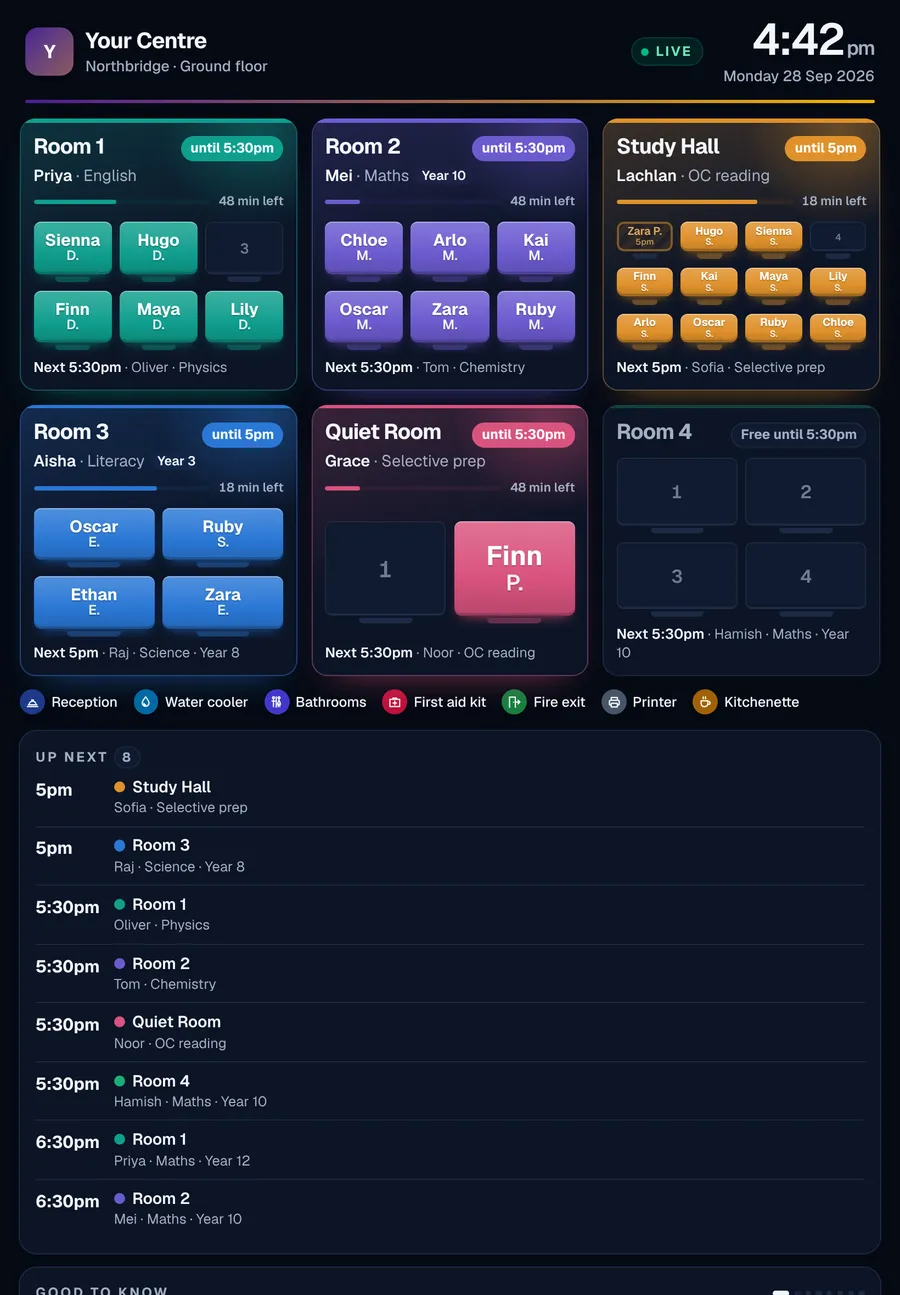
Wall screen
- days seated ahead, every night
- 8
- between wall screen updates
- 45s
- kinds of marker on a plan
- 10
- ways to name students on the wall
- 3
Floor plans
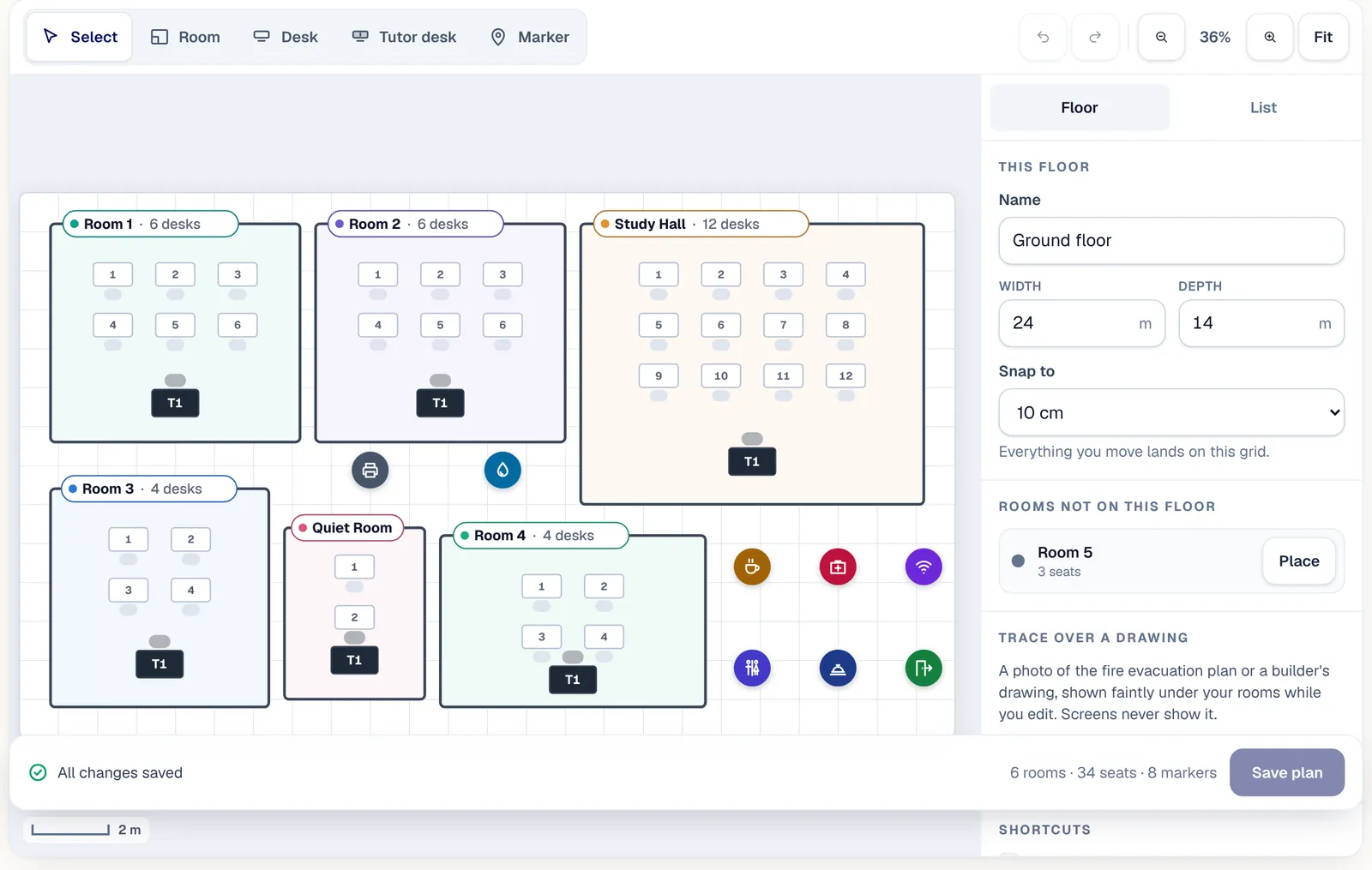
No more rooms on a whiteboard. Draw the centre once, in the browser.
- 01
Drag in the rooms
A floor plan on paper helps nobody book a room. Draw each room to scale on a snapping grid, resize it and turn it in quarter turns. Trace over a photo of the fire evacuation plan if you have one.
- 02
Add the desks
Student desks and tutor desks, one at a time or a whole row at once. The student desks you draw become the room's seats.
- 03
Mark the useful places
Water, bathrooms, kitchen, printer, first aid, fire exit, Wi-Fi, a quiet area, reception, or anything else, each with a line of instructions and a photo if it helps.
Undo, nudge and zoom
Undo and redo, arrow keys to nudge, zoom and pan, and a list view that does everything without the drawing.
Nobody overwrites anybody
If someone else saves the plan after you opened it, you are told before anything is lost, never quietly replaced.
Works on a phone
Look around the plan, rename things and edit markers from a phone. Drawing works best on a tablet or computer.
Every campus, every floor
One plan per floor, as many floors as a campus has, and each campus kept apart.
Desk seating
Nobody hunting for a seat. Seating that sorts itself, every lesson.
Seating children by hand every afternoon eats the front desk's time. Each lesson at the centre is given its desks as soon as it is booked, children sit where they sat last week, and nobody is ever put on a desk someone else holds.
Back at last week's desk
Children settle faster at a desk they know. A student goes to the desk they had for the same lesson last week, else the desk they use most in that room, else the free desk nearest the tutor.
Never two people on one desk
Two children sent to one desk is a bad start to a lesson. A desk held by one lesson is never given to an overlapping one, even in a shared room. When a room is full, the student left over is reported, not squeezed in.
Staff choices stick
Drag someone to another desk, or pick it from a list. A move made by staff is kept for that lesson, and the automatic seating only fills in who is missing.
It keeps up by itself
Booking, moving or re-rooming a lesson seats it again in the background, and every night the next 8 days are seated ahead.
Only lessons at the centre
Online lessons and lessons at a student's home never take a desk, and never hold one against anyone else.
Room occupancy
Every room, hour by hour. And how hard it worked.
The front desk needs a free room now, and the owner needs to know which rooms earn their rent. Now, the day, the week and the floor plan itself, for one campus or all of them, answer both.
Now
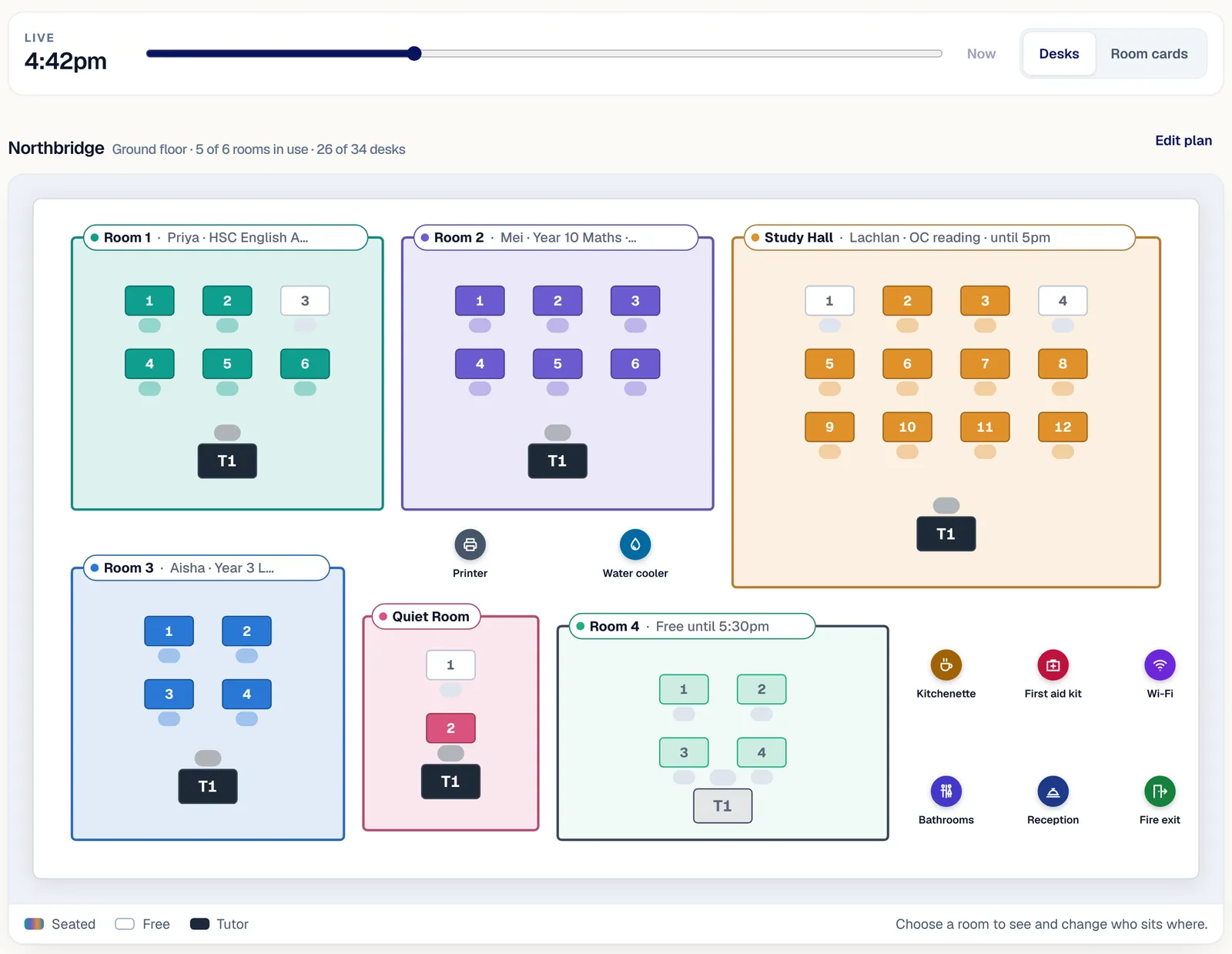
No more walking the corridor to find a free room. Every room at a glance: who is in it, the desks filled, the minutes left and what is next.
The day
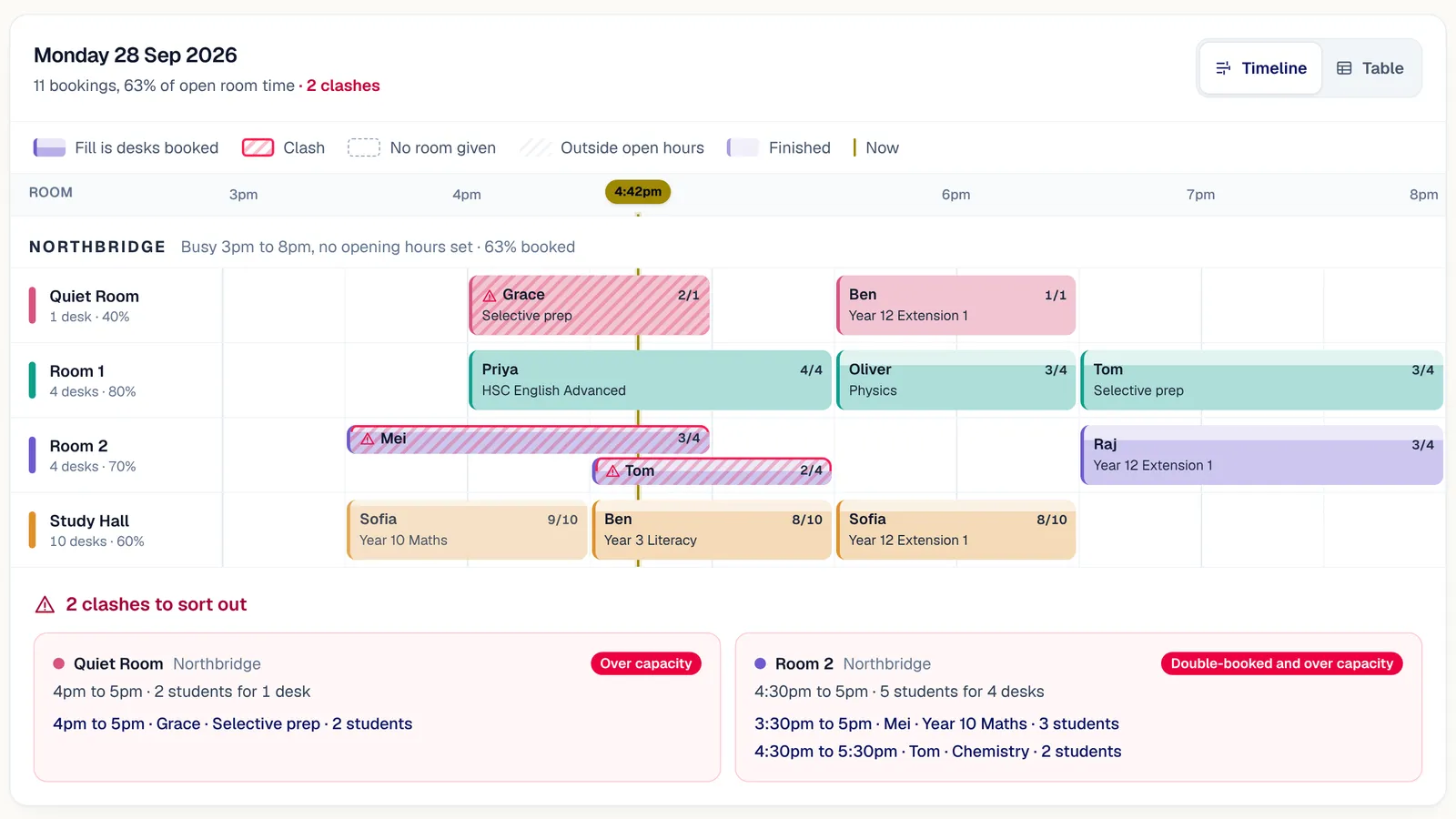
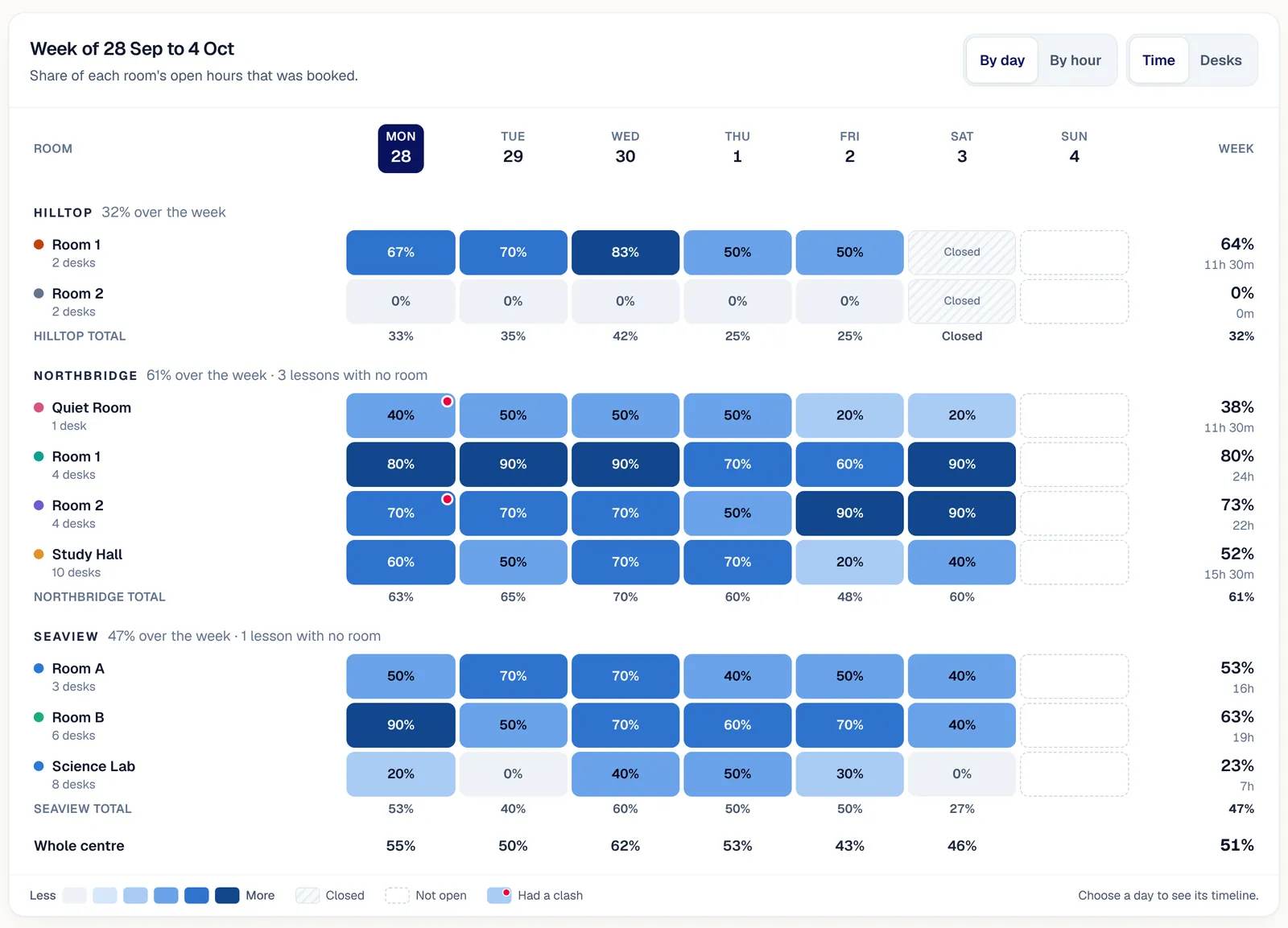
A timeline of every room hour by hour, with clashes drawn in red and the time outside opening hours hatched out.
The week
A heatmap of how hard each room worked, the peak hour, the busiest room and the rooms nobody used.
The floor plan, live
The drawn plan at any time of day, with every seated desk in its room's colour. Slide the time to see the evening fill up.
Opening hours and shared rooms
Busy figures that mean something: measured against your own hours.
Opening hours per campus
Set each weekday's hours, or closed, with one tap to copy Monday to the other weekdays. Busy figures are booked time out of hours open.
Shared rooms
Switch a room to shared and small lessons can run in it side by side. It is only a clash when the students together are more than the desks.
Clashes stopped at booking
A double-booked room is found at the door, too late. The same rule runs when a lesson is booked: a room that is not shared is never double-booked, and a tutor can never be in two lessons at once.
The front desk can look
Reception can see every room without being able to change one. Changing rooms stays with the people you choose.
Opening hours
Copy Monday to weekdays- Monday3pm to 8pm
- Tuesday3pm to 8pm
- Wednesday3pm to 8pm
- Thursday3pm to 8pm
- Friday3pm to 8pm
- Saturday9am to 3pm
- SundayClosed all day
The campus wall screen
A TV that tells everyone where to sit.
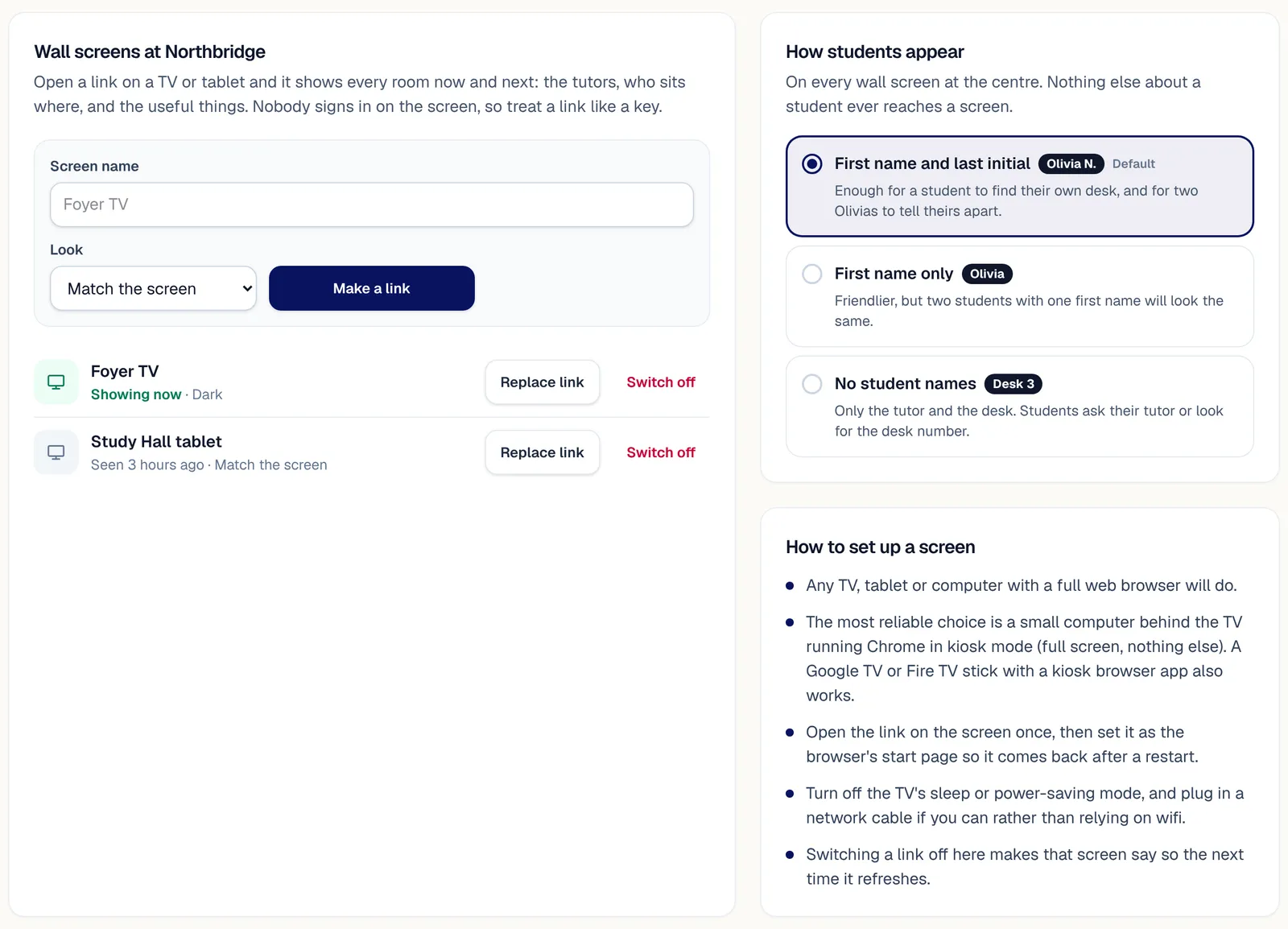
Students arriving at once crowd the front desk asking where to go. Put your rooms on a screen in the foyer: students find their name on their desk, tutors see their rooms, and the centre chooses how much of a name to show.
A link, not a login
A screen should not need a staff password left on it. Open the link on any TV or tablet and it shows every room. Nobody signs in on the screen, and the link is shown once and stored only in scrambled form.
First names only
Tutors by first name, and students as you choose: first name and last initial, first name, or no names at all. Nothing else about a child reaches the screen beyond the lesson's subject and year group.
Switch it off from anywhere
Turn a link off and the screen goes blank at its next update. A screen never links into the portal.
Every room, now and next
A card for each room, in the order of your floor plan: the tutor, the subject, the time left and what is next, with each student's name on their own desk. Rooms in use show in their colour; free rooms stay quiet.
Big campuses, page by page
Up to eight rooms show at once. A campus with more turns the page every 20 seconds.
Children's privacy
A screen in the foyer, not a window into the portal.
A wall screen shows first names, desks and each lesson's subject and year group, never a student's surname, results or contact details.
Nothing on a wall screen is sent to analytics, and switching a link off takes effect at the next update.
Lessons at a family's home are never placed on a floor plan or a wall screen.
Set it up in an afternoon
The guide walks through opening hours, drawing a campus, seating and putting a screen on the wall.
In short
Rooms and seating
XTutio lets a centre draw each campus once, then gives every lesson at the centre its desks, with each student back where they sat last week. The front desk sees every room hour by hour, and a screen on the wall shows everyone where to sit, by first name only. Rooms follow the timetable in Scheduling, families see the campus in the parent app, and the rooms, floor plans and wall screens guide walks through drawing a campus.
Questions centres ask
Does it seat students automatically?
Yes. Each student goes back to last week's desk where they can, and staff choices stick.
What does the wall screen show?
Each room's tutor, subject and students by first name, from a link rather than a login, which you can switch off from anywhere.
Does it stop double bookings?
Yes. A room clash is stopped at booking, and shared rooms count their seats.
