
6 min read · Updated 2026-10-18
In short
Online tutoring works when the tutor has a pen and a shared whiteboard, everyone checks their camera and microphone before the lesson, and students wait until the tutor is in. Keep it safe by letting parents join, never giving a tutor a private written channel with a child, and sending the board and a short note home afterwards.
General information, not legal advice. Laws and the regulators' rules change: check the sources below, and talk to your own adviser about your centre.
A parent who pays the same for an online lesson as one at the centre is quietly asking one question: is this worth it? They hear the first five minutes from the kitchen, as the tutor says "can you hear me now?" for the third time, and they wonder. The tutor feels it too, fighting a frozen screen while the clock runs. The good news is that almost every problem in an online lesson can be designed out before it starts.
The equipment that matters
A tablet with a stylus changes online maths more than anything else. Typing an equation is slow and hides the working; writing it on a shared board shows every step, including the one that went wrong. A laptop is fine for English and humanities, where the work is mostly reading and talking.
- A tablet or laptop with a working camera, for tutor and student
- A stylus for maths and science tutors
- Headphones with a microphone, so the room's echo stays out
- A wired connection or a seat close to the router
- Light in front of the face, not behind it
- A quiet space where a parent can walk past
Make the whiteboard the lesson
Faces matter for hello and goodbye. In between, the shared whiteboard should fill the screen. Hand the pen to the student early and often: if the tutor has been writing for five minutes straight, stop and give the student a question to start. Ask the student to talk through each line, because online you cannot see them hesitate the way you can across a desk.
Prepare the board before the lesson: a worksheet page, a graph grid, the past paper question you plan to use. Turning pages together keeps everyone in the same place, and a tidy board is something worth sending home. Our whiteboard was built for exactly this, with a ruler, a protractor, graph paper and typeset maths alongside the pen.
A waiting room, and a check before joining
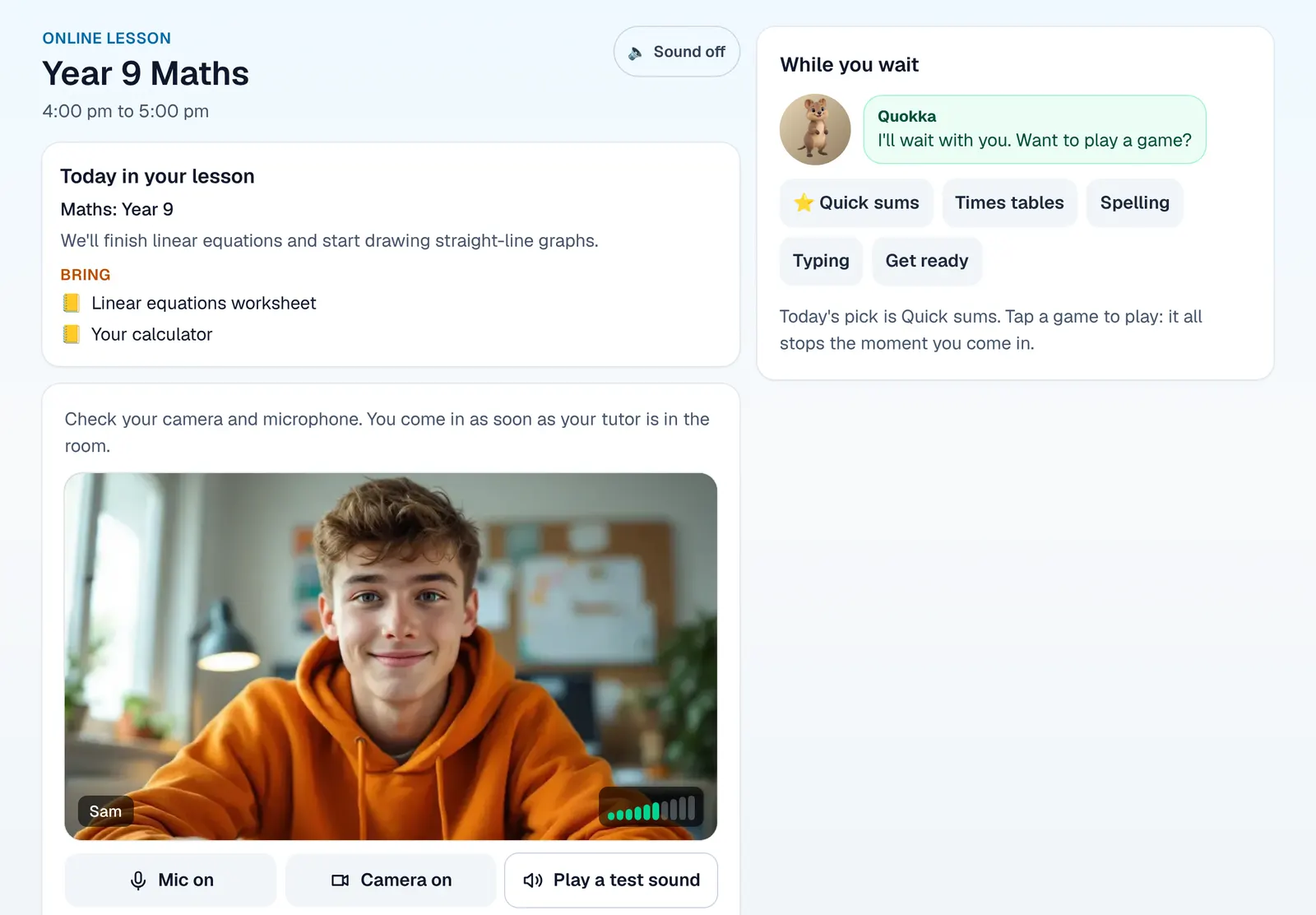
Two problems ruin the start of most online lessons: a student who arrives before the tutor and sits alone in the room, and a microphone that nobody can hear. Both are easy to fix with a routine.
- Students wait until the tutor is in, or until the tutor lets each one in. Nobody sits in an empty room with strangers.
- Everyone checks their camera, microphone, speakers and connection before joining, so problems are found while there is still time to fix them.
- The room opens a little before the start, so a family can sort out a problem without eating into the lesson.
- Give waiting students something useful to do, such as a short warm-up at their own level.
Parents in the room
Let parents join their own child's online lesson, and make sure everyone can see when a parent, or anyone from the centre, is in the room. Parents who can drop in for the last ten minutes trust the lesson more, and a tutor who knows anyone might look in keeps good habits. It also gives a parent at work a way to see what was covered without a separate meeting.
- Before
Waiting room, and a camera, microphone, speaker and connection check.
- During
The whiteboard is the lesson; the student writes more than the tutor.
- Last minutes
Board home as a PDF and a short note for the family.
- After
Confirm the roll and set the homework.
Safety: no private channel with a child
In NSW, tutors are among the roles the Office of the Children's Guardian lists as needing a Working with Children Check, and that does not change because the lesson is online. The NSW Child Safe Standards also ask organisations to manage risks in online environments, and to use them in line with their code of conduct. Other states have their own schemes, so check yours. Our working with children check article covers the check itself.
In practice, the simplest rule is that nothing written in a lesson goes to one person privately. That means no direct messages between a tutor and a student, no swapping phone numbers or personal accounts, and reactions limited to a fixed set rather than free text. Put it in your code of conduct and train every tutor on it before their first online lesson.
- Only the tutor, the students on the roster, their parents and permitted centre staff can get in
- Lessons open only around their booked time
- No private messages between a tutor and a student
- Tutors use the centre's room, never a personal link
- Everyone can see who is in the room
- Concerns go to your centre's safety contact the same day
Finish with notes, not just goodbye
Leave the last few minutes for wrapping up. Send the board home as a PDF, write a short note for the family that names the skill, one strength, one thing to work on and the next step, and confirm the roll. A family that sees exactly what happened in an online lesson is far less likely to ask whether it is worth the same as one at the centre.
This is where a tutor running their own video link and a separate whiteboard loses most time: the board has to be exported by hand, the note typed into another system, the roll marked somewhere else again. When the classroom, the board and the lesson record live in one place, those last five minutes shrink to one.
In XTutio, the online classroom is booked like any lesson and opens 15 minutes before it starts. It has a waiting room with a camera and microphone check, parents who can join their child's lesson, five reactions and a raised hand with nothing sent privately, and the time left in the top bar with a nudge near the end. The tutor saves the board as a PDF for the family's home page, and the roll is filled in from who was connected, ready to confirm. Our article on teaching in your own online classroom walks through it, and the online classroom guide shows how to switch it on.
Questions centres ask
- Do online tutors need a Working with Children Check in NSW?
- The Office of the Children's Guardian lists tutors among the roles that need a check, and the lesson being online does not remove that. Check the rules in your own state, and ask the Office of the Children's Guardian if a role is unclear.
- Should parents be allowed in online lessons?
- Yes, as long as everyone can see that a parent is there. It builds trust, lets a working parent see what was covered, and keeps the lesson open rather than private.
- What equipment does an online maths tutor need?
- A tablet with a stylus, headphones with a microphone and a steady connection. Writing on a shared whiteboard shows every step of the working, which typing cannot.
Sources
- What are the Child Safe Standards, NSW Office of the Children's Guardian. Read 2026-10-17.
- Who needs a Check, NSW Office of the Children's Guardian. Read 2026-10-17.
