6 min read · Updated 2026-10-18
In short
The after-school rush goes smoothly when every student already has a desk before they walk in and a screen at the door says where it is. Draw each campus once, let the timetable seat each lesson automatically, and give reception a view of every room hour by hour, so double bookings are caught at booking rather than at the door.
Ask anyone who works the front desk of a tutoring centre about 3:55 pm on a Tuesday. Twenty students arrive in ten minutes, three tutors are still finishing the last lesson, a parent wants a word, and two Year 9s are standing in a doorway asking which room they are in. Someone at reception is reading a printed timetable and pointing. Nobody is learning anything yet.
The rush itself is fine; it is the questions that slow it down. Where do I go? Where do I sit? Is my tutor here? Every one of those questions has an answer the centre already knows, sitting in the timetable. The job is getting that answer to the student before they have to ask.
Who the scramble costs
- Reception, who answers the same question twenty times instead of greeting the parent in front of them.
- Tutors, who lose the first five minutes of a lesson to settling, and sometimes to finding out their room is double booked.
- Students, especially the younger and the anxious ones, for whom not knowing where to go is the worst part of the afternoon.
- The owner, who pays for every one of those lost minutes and rarely sees them.
Draw each campus once
Everything starts with a plan of the building. In XTutio, staff drag in each room on a snapping grid, add student and tutor desks one at a time or a whole row at once, and mark the useful places: water, bathrooms, first aid, the fire exit, the Wi-Fi, a quiet area. The student desks you draw become the room's seats, so the capacity you book against is the furniture that is actually there. It takes an afternoon, and the guide to rooms, floor plans and wall screens walks through it step by step.
- Draw the rooms
Each room to scale on a grid, turned and resized as the building is.
- Add the desks
Student and tutor desks; the student desks become the room's seats.
- Book as usual
Every lesson at the centre is given desks in the background.
- Open the screen
A link on a TV or tablet shows every room, now and next.
Seat every lesson before anyone arrives
Children like their own desk. Once the plan exists, XTutio seats every lesson at the centre without anyone asking: a student goes back to the desk they had for the same lesson last week, otherwise the desk they use most in that room, otherwise the free desk nearest their tutor. A desk is never given to two overlapping lessons, and when a room is full the student left over is reported rather than squeezed in. Each night the next eight days are seated ahead, and booking, moving or re-rooming a lesson seats it again on the spot.
Staff stay in charge. Drag a student to another desk, or pick one from a list, and that choice sticks for the lesson. Online lessons and lessons in a family's home never take a desk, and never hold one against anyone else.
A screen at the door does the pointing
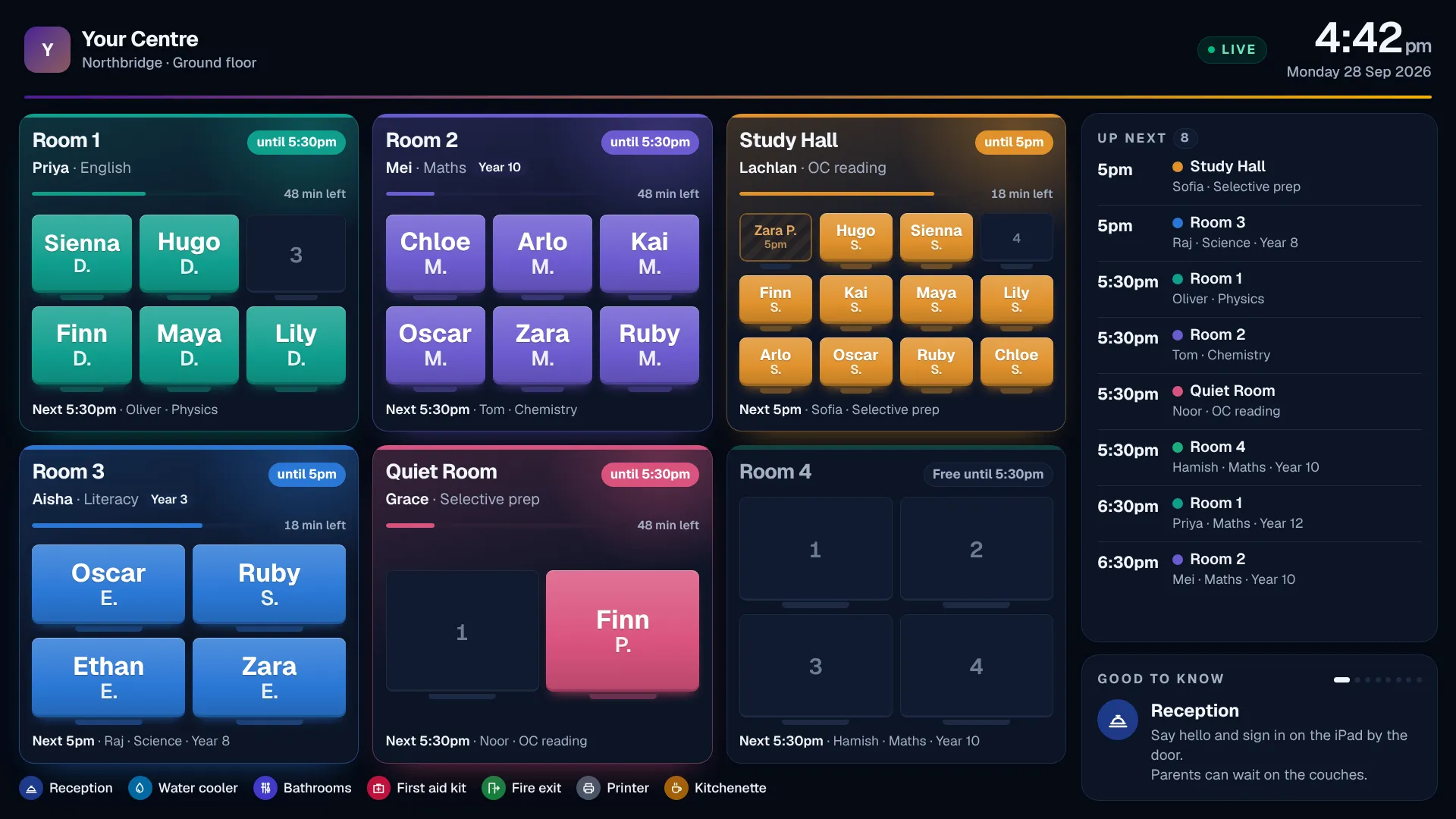
The wall screen is a link, not a login. Open it on any TV or tablet in the foyer and it shows a card for each room in the order of your floor plan: the tutor, the subject, the time left, what is next, and each student's name on their own desk. Up to eight rooms show at once and a bigger campus turns the page every 20 seconds. It refreshes itself every 45 seconds, so a late change reaches the screen before the student does.
Parents rightly ask what a public screen shows about their child. Tutors appear by first name, and students as the centre chooses: first name and last initial, first name only, or no names at all. Nothing else about a child reaches the screen beyond the lesson's subject and year group. Switch a link off from the portal and the screen goes blank at its next update.
Let reception see every room
Reception needs to see the building, not redesign it. XTutio's occupancy view shows every room now, a timeline of the day with clashes drawn in red, and a weekly heatmap of the rooms that worked hardest and the ones nobody used. Receptionists can look without being able to change a room. Opening hours are set per campus, so busy figures are booked time out of hours open, and a room you mark as shared can run small lessons side by side until the students outnumber the desks.
The same rule runs when a lesson is booked in scheduling: a room that is not shared is never double booked and a tutor is never in two lessons at once, so the clash is caught at the desk where it can be fixed, not in a doorway at 4 pm.
Before your next busy afternoon
- Every campus drawn, with student desks in each room
- Opening hours set for each campus and weekday
- Shared rooms marked as shared, and the rest left single
- Reception given view-only access to rooms
- A wall screen link opened on a screen near the door
- Student names on the screen set the way your families expect
- Tutors shown where their students sit on the seating sheet
How XTutio helps
Rooms, desks, occupancy and wall screens are part of the same portal as your timetable, so the plan, the seats and the screen never disagree. See rooms and seating for the whole picture, and the front desk tools for what else reception runs from the same place.
Questions centres ask
- How do tutoring centres tell students which room to go to?
- The smoothest way is a screen near the door that shows each room's tutor and the students in it. When every lesson is seated from the timetable before students arrive, nobody has to ask reception.
- Is it safe to show students' names on a wall screen?
- Keep it to the least you need. Show first names, or a first name and last initial, or no names at all, and never results or contact details.
- Can students keep the same desk every week?
- Yes. In XTutio a student goes back to the desk they had for the same lesson last week unless staff move them, so the room feels familiar from the first minute.
