
7 min read · Updated 2026-10-18
In short
Choose tutoring centre software by testing it against your real week: book and move lessons, run a billing cycle, and look at what a parent sees. Check who the merchant is when families pay, where records are stored, what child safety controls exist, how your data comes across, and whether the price follows students or staff.
Most owners start looking for new software after a bad week: a tutor off sick and three families who were never told, an invoice run that billed a cancelled lesson, a parent ringing at 9 am to ask something the app should have answered at 9 pm. The danger is buying the demo rather than the system. Centres change software only every few years and the move costs weeks of front desk time, so it pays to be fussy. Every point below is something you can test in a trial with your own lessons, not a feature name on a brochure.
A useful rule: bring three real situations from last month to every demo. A tutor off sick on a Thursday, a family who cancelled late and disputed the fee, and a new enrolment with two children at different campuses. Ask to see each one handled on screen.
Scheduling: how a lesson moves
Booking a lesson is easy in every system. Moving one is where they differ. When a lesson changes time or tutor, you want to see the knock-on effects before you save: a tutor already teaching, a room in use, a closure, a tutor on leave. Ask whether a family is told automatically or only when you choose, because an unexpected email about a change you were still sorting out causes more calls than it saves.
- Repeating lessons: can you see every date in a series, with its clashes, before you book it?
- Cover: can a lesson be covered for one week without handing the student to a new tutor for good?
- Daylight saving: does a 4 pm weekly lesson stay at 4 pm after the clocks change?
- Tutors on phones: can a tutor see their day, and is a move from a phone held to the same checks as the front desk?
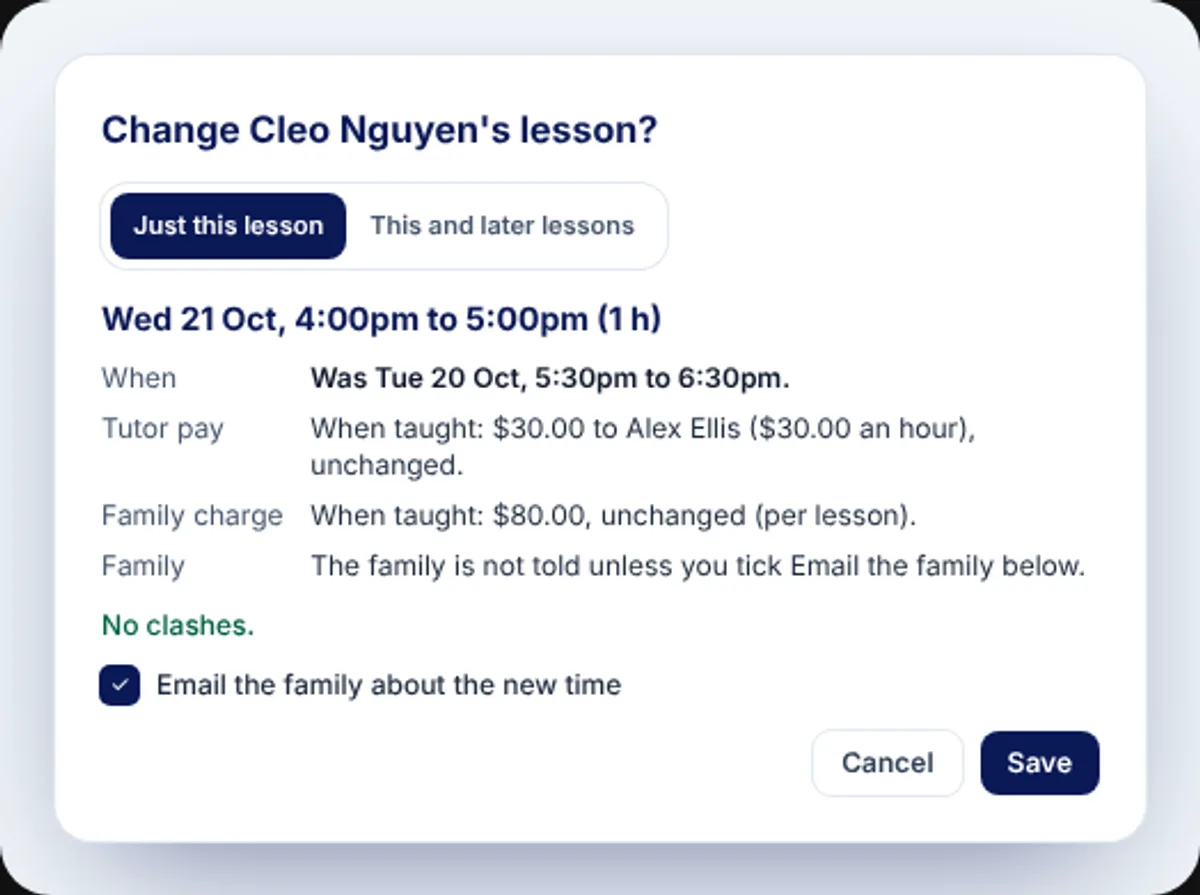
This is the test XTutio was built to pass. Drag a lesson on its calendar and nothing saves on the drop: a card shows the new time, the tutor's pay, the family charge and every clash, asks whether this is cover or a change of tutor, and emails the family only if you tick the box. Repeating lessons list every date with its clashes first, and are booked on your centre's own clock. See scheduling.
Billing: who is the merchant?
Ask a plain question: when a family pays, whose name is on their bank statement and whose account does the money land in? Some systems collect on your behalf and pay you later; others let your centre be the merchant on its own account. Both can work, but you should know which, what the fee per payment is, and how a bounced payment is retried. Then run a cycle: mark a lesson taught, cancel one late, credit one, and invoice the week. Check that an issued invoice is corrected with a credit note rather than edited. Our cancellations guide shows the kind of rules worth testing.
In XTutio each centre is the merchant on its own connected account and families pay by direct debit. XTutio's fee on a payment: a stated fee per payment, shown to you before you switch payments on. Money sits in one ledger that is never edited: a correction is a credit note or a reversal. More on family money and payroll.
The parent app
Sign in as a parent during the trial. Can they see every child on one screen, the tutor's note after a lesson, homework and the calendar, and the cost of cancelling before they press the button? Does the app carry your centre's name and colours, or the vendor's? Is there help inside the app, written for parents, so the 9 pm question gets answered without a call?
Security and who sees what
Ask where the database, sign-ins and stored files run, and where any AI requests are processed, which can be a different place. Ask which outside providers handle email, video and maps. A vendor should answer in writing and tell you before any of it changes.
- Two-step sign-in, and can you require it of every staff member?
- Can you read, in plain words, what each staff role is allowed to do?
- Is each centre's data kept apart by the database itself, not only by the screens?
- Are connection keys and passwords encrypted, and never shown again once saved?
- Is every data export and sensitive change written to an audit log?
- If you leave, how quickly do you get a copy of your data?
Child safety controls
Software cannot make a centre child safe, but it can make the safe thing the easy thing. Look for a check of a tutor's Working with Children Check when a lesson is booked, no private written channel between staff and a child, a way for parents to raise a concern from the app, and AI features that take names out before a request leaves. Ask to see each, not to be told about it. XTutio does all four; see safety.
Importing, and running both for a while
Moving families, students and tutors across is the riskiest day of the switch. A good import shows a preview first, says why any record is skipped, can be run twice without making duplicates, and does not email your families on the day. Ask, too, whether you can run the new system beside the old one: keep lessons where they are for now and hold family charging until a date you choose, so nobody is billed twice. XTutio's import and its side-by-side settings are on switching to XTutio.
- Mark a lesson taught
Check the charge appears.
- Cancel one late
Check the fee matches the policy you wrote.
- Credit one
Check an issued invoice gets a credit note, not an edit.
- Invoice the week
Check what the family would actually receive.
Pricing: per student or per tutor
Pricing usually follows one of two shapes. Per tutor or per staff seat suits a small team with many students each, but punishes you for hiring casual tutors for exam season. Per active student follows your enrolments, so a quiet term costs less. Work out both against your last twelve months, including your busiest term, and add the payment fees and any usage charged on top.
- Is there a setup or onboarding fee?
- Are campuses, parents or extra admins charged separately?
- What is metered on top: email, text messages, video, AI?
- Can you bring your own accounts for those so you are not billed twice?
XTutio is priced per active student per month, with no setup fee and no charge per tutor, campus or parent, and a 30-day free trial that someone at XTutio sets up within one business day. A trial is only useful if you run your real week in it: one campus, your real prices, a slice of your families and one tutor teaching.
Questions centres ask
- What should I test first in a tutoring software trial?
- Move a lesson, cancel one late and invoice a week, using your own services and prices. Those three show you more about a system than any feature list.
- Is per-student or per-tutor pricing cheaper?
- It depends on your ratio of students to tutors and how much it swings by term. Price both shapes against your last twelve months, including your busiest term and any payment fees.
- Why does it matter who the merchant is?
- The merchant is the business whose name families see and whose account the money settles to. Knowing it tells you how quickly you are paid, who handles disputes and what fee comes out of each payment.
